
Answer from the inbox
Reading a thread, seeing where the person is, and what resolving does.
Inbox holds every conversation, whether it started as a question or a bug report. Open one and you get the thread on the left and everything teem knows about the person on the right.
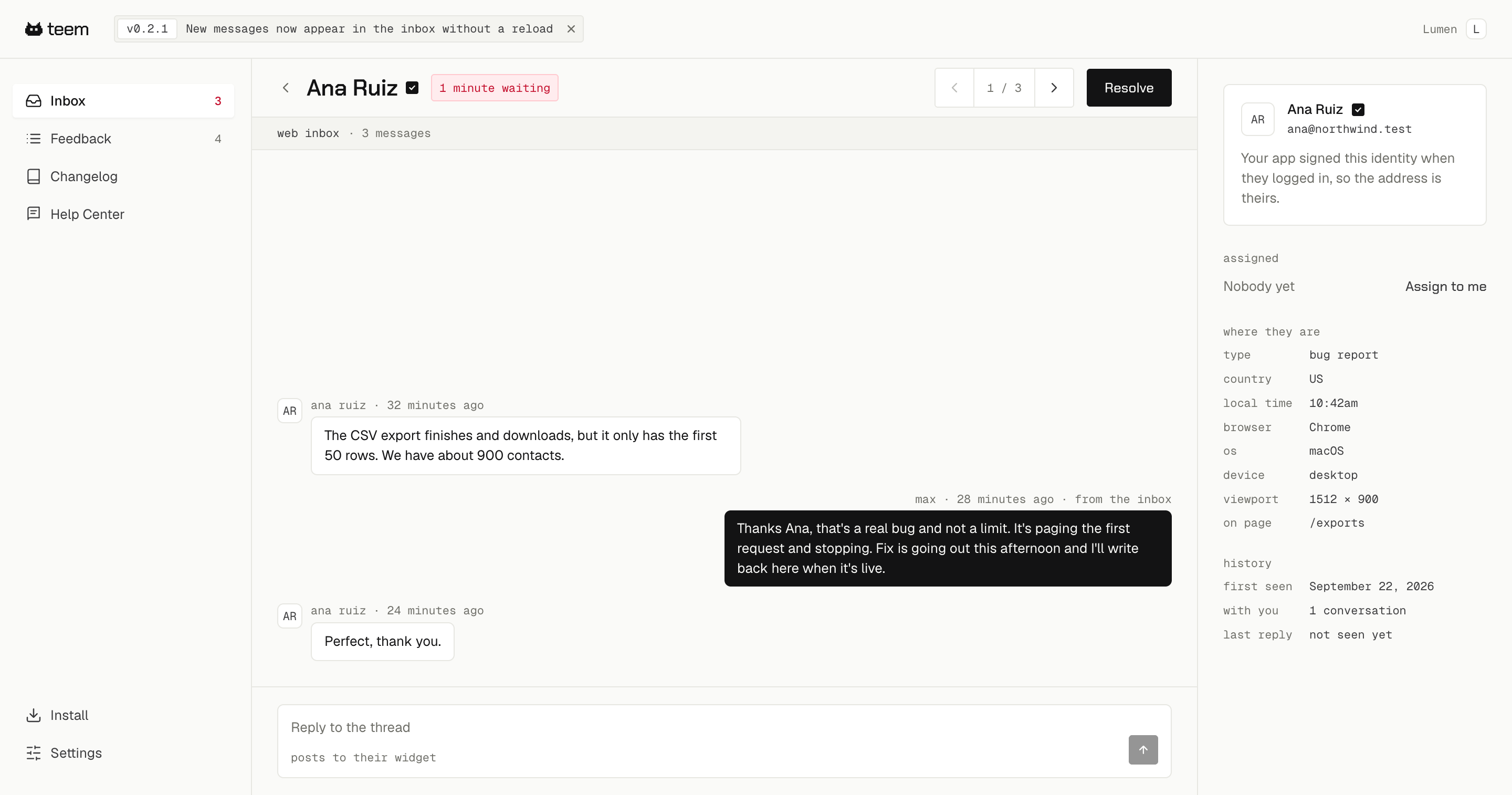
The panel on the right
You did not have to ask for any of this and they did not have to tell you.
- Whether their identity is verified or self-declared
- Country, local time, browser, operating system, device and viewport
- The page they were on when they wrote
- How long they have been a user, how many conversations they have had with you, and whether they have seen your last reply
The last one is the useful one when you are wondering whether to follow up. last reply · not seen yet means your answer is sitting there unread, not that they are ignoring you.
Replying
Type in the box at the bottom. Your reply appears in their widget, and if they are not currently looking at your app, teem emails it to them so the conversation carries on wherever they are.
Replies are signed with your name, which is why teem asks for one when you first sign in.
Assigning
A conversation starts unassigned. Assign to me puts your name on it so the rest of the team can see somebody has it. It changes nothing about who is allowed to reply.
Resolving
Resolve closes the conversation and takes it out of the open count. It is not permanent: if the person writes again, the conversation reopens by itself and comes back to the inbox. You do not need to keep something open just in case.